Please visit our sponsors

InFocus Play Big IN76 Projector Review - Overview
4/22/2006 - Art Feierman

Overview
Image Quality
General Performance
Warranty
Summary, Pros, Cons

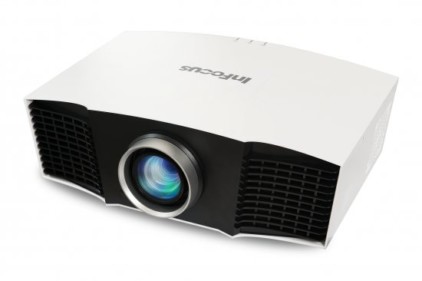
This is the InFocus IN76 projector.The InFocus IN76 (officially, the Play Big IN76), has been long awaited. InFocus spoke of this projector, and their other new "Play Big" home theater projectors that were recently released, as far back as the CEDIA show last September. InFocus had demos going at the CES show in Las Vegas, this past January. It could be said that the IN76 is replacing two different older InFocus projectors. It is a 720p resolution projector, like the LCD powered ScreenPlay 5000, and the DLP based ScreenPlay 7205. The old "5000" sold for less than the current IN76 pricing but is far more limited in performance, and the ScreenPlay 7205, sold for far, far more. From a performance standpoint it is definitely much closer to the comparably pricey ScreenPlay 7205.

The Play Big IN76 is now the least expensive of InFocus's current 720p resolution projectors. InFocus also offers the less expensive Play Big IN72, and Play Big IN74EX home theater projectors, with lower, non-HD native resolutions (480p and 576p resolution, respectively).

The IN76 started shipping end of March, almost a month ago. Unfortunately getting an official "evaluation unit" IN76 from InFocus is not easy, and they have a long list of reviewers waiting. This time, I was able to get their permission to borrow an IN76 from one of their authorized dealers, instead of waiting longer. As a result, my thanks to Visual Apex, a major online reseller, for providing me with a brand new IN76 in an unopened box. InFocus (actually their PR firm that runs their eval program) sent me their "reviewers guide" by email.

Stunning! Without a doubt, the IN76 is as good a looking projector as you will find. Most projectors (especially under $5000) are basic "boxes". A few have some sculptured lines, and a couple, like the Epson Cinema series are stylish. That said, the InFocus, in my opinion, is the best looking home theater projector in its class.

That's nice, but more importantly, is what happens when you turn it on and watch? This is a picture of a castle projected by the InFocus IN76.

The IN76 home theater projector is definity a contender, designed to compete with the Optoma HD72, BenQ PE7700, Mitsubishi HC3000 and other DLP HT projectors, as well as LCD projectors from Sanyo, Panasonic and Epson. It is interesting to note up front, that InFocus chose the 1280x720 resolution Darkchip2 DLP chip to power the IN76, while several other new entries, notably the Optoma HD72 and the Mitsubishi HC3000 have gone with the dual purpose 1280x768 Darkchip2 instead. In other sections we will look at the advantages of each. We'll explore as much as we can of the Big Play IN76, beginning now, with the IN76 home theater projector's basic attributes:

MSRP: $2999
Technology: Darkchip2 DLP projector
Native Resolution: WXGA 1280x720
Brightness: 1000 lumens
Contrast: 3000:1
Zoom Lens ratio: 1.2:1
Lens shift: Vertical and Horizontal
Lamp life: 3000 hours
Weight: 9.3 lbs.
Warranty: 1 year

Physical Tour:

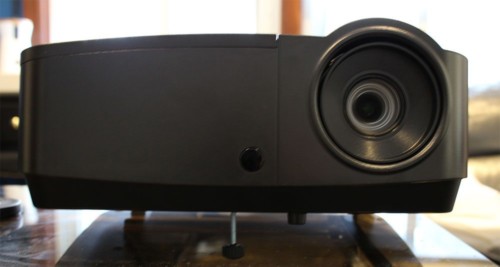
Starting, facing the front of the InFocus IN76, all there is to see, is the recessed zoom lens mounted to the right of center. On the far left is an infra-red sensor that is pretty hard to spot due to the shiney black sculpted case of the projector. If you are running it on a table, you'll also be well aware of the attached pedestal, which allows you to tilt and swivel the projector to the desired position.This is the front of the InFocus IN76 projector.

The Pedestal works great, I should point out, and it is easily removable if you are going to ceiling mount the projector. I like the idea of the pedestal instead of the traditional 3 or four adjustable feet.

The lens is a zoom with an 1.3:1 zoom ratio, providing a little more placement versatility than most DLP projectors in its class, which typically have 1.2:1 zooms. The throw ratio, is best described as medium. For example, to fill a 100" diagonal screen, you can place the IN76 as close as 11 feet and as far back as about 13 fee 10 inchest. If you have a fairly deep room, you won't be able to place the projector back far enough to sit on a rear wall shelf, however it should work for most people.

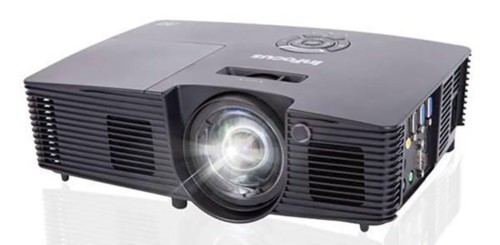
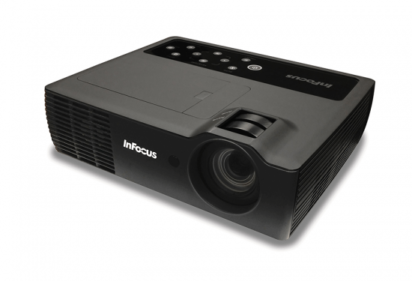
Moving to the top of the projector, in the front, just back from the lens are two concentric rings. The inner ring focuses the projector, while the outer one controls your zooming the image in or out.This is the top of the InFocus IN76 projector.

Also found on the top, across the back, is the control panel. It is a nice, simple panel with only 6 buttons, and laid out to navigate easily. From the rear, the left most button is power. Once to turn it on, once to turn off. Next are four keys in a diamond shape. The first is the Menu button, then come the up and down arrows, and finally on the right, the select button. InFocus does not use the usually 4 arrow key configuration (plus an Enter and back/escape button), that is most typical, however their system works pretty well after you get used to it a bit. I'm familiar with this layout from other InFocus projectors I have reviewed, and the first time I encountered it, I was perfectly comfortable with their navigation scene, long before the review was finished. I'll discuss this more in the General Performance section where I cover the IN76's remote control.

That takes us to the back of the projector where you will find all the projector's inputs. The IN76 projector is slightly better equipped than most other home theater projectors. This is due to being one of the few so far that has the ability to have two digital inputs.

Review continues below this advertisement.


On the left side you can see a 12 volt screen trigger to control a motorized screen. Then comes the HDMi digital input, but also next to it, is InFocus'es proprietary M1 connector. InFocus has been pushing this unique connector for several years. In this configuration it can accept both a digital, or an analog signal. For those of you familiar, at first glance the M1 connector looks like a DVI connector, but it is wider, with more pins. Still, it fully supports DVI (which is essentially the same as HDMI, but does not also carry audio, like HDMI. (Since home theater projectors have no speakers, no one should care!). This is the InFocus IN76 projector's back panel.

Alternately, instead of a digital input, with an analog adapter, you can feed the M1 an analog computer signal, or a component video signal. So, effectively the IN76 can have two separate digital sources, or one digital, and one analog (the analog could be data, or video). In addition there are the 3 RCA jacks for a standard component video source, or for parts of the European market, all 4 RCAs make up the SCART input. And, like all projectors there are the two standard "low resolution" inputs - S-video, and composite video. To round things out, there is an RS232 serial port for command and control, and the power cord input.

This is a picture from The 5th Element by the InFocus IN76.

That pretty much covers the physical attributes. Time to take a look at the Play Big IN76's image quality.


Overview
Image Quality
General Performance
Warranty
Summary, Pros, Cons


Projector Search
Projector Packages