Please visit our sponsors

Optoma HD65 Home Theater Projector Review: Overview and Physical AttributesOur Hot Product Award.

5/22/2008 - Art Feierman

Optoma HD65
Image Quality
General Performance
Warranty
Summary, Pros, Cons

Optoma's on a roll, this is the second new Optoma 720p DLP projector I've reviewed in the last month. The last Optoma review, their extremely bright (for a home theater projector) HD71, picked up our Hot Product Award, and I'm pleased to announce that the HD65 also receives the award.

The Optoma HD65 projector.The HD65 is a Darkchip 2 DLP projector with a 4x color wheel, claiming 1600 lumens. The projector's AI (artificial intelligence) takes claimed contrast from 3000:1, to 4000:1, when engaged.

The Optoma HD65 has a lot of things going for it, but, the things that impressed me the most, and that led to the award, are its especially good out of the box color accuracy, combined with a very rich and well saturated image. In addition, it just happens to be pretty bright. Not as bright as the HD71, but it still has more lumens than most.

The HD65 may not be for everyone, as it is especially small, and has some limitations as well. Notably its fan is on the noisy side, plus it does leak some light. and, no surprise, like most DLP projectors, it is rather limited in terms of placement flexibility. Still, most impressive for an under $1000 home theater projector!

Gandalf image from the Optoma HD65 projector.

Gandalf (above) from Lord of the Rings, looks great - very impressive considering it's standard DVD, not Blu-ray, or HDTV.

And, it sure is fun to watch. A few hours ago, my wife commandeered the theater for tonight's final sing off on American Idol in Hi-Def. At this point, the HD65 has been calibrated in its Cinema mode, and also in Bright. I set it up for her in Bright mode, and grabbed my laptop to get some work done while watching.

I have to tell you, the HD65 really looked great, and we even had some low lighting on, and the projector was filling about 120" of my 128" screen. I even switched back to the Cinema mode, and it looked even better, though a little dimmer.

Being sufficiently impressed with both Optomas I have decided to do a comparison piece between the two. Look for that within a week of this review's publish date.

Optoma HD65 Projector Highlights:

  • Really good out of the box color
  • Only a 4X color filter wheel, so those sensitive to the rainbows will see more rainbows, as most DLP projectors have 5X wheels
  • Extremely small - Very reasonable to take with you.
  • Very limited placement flexibility - zoom lens only 1.1:1, making this a table top or ceiling mount projector.
  • Very good remote control
  • Good, although not exceptional black levels
  • Only $999 makes it one of the least expensive
  • Excellent price performance

Nia image from the Optoma HD65 projector.

Optoma HD65 Home Cinema Projector: Basic Specs

Review continues below this advertisement:


MSRP: $999
Technology: Single Darkchip2 DLP
Native Resolution: 1280x720
Brightness: 1600 lumens
Contrast: 4000:1 (with AI engaged), 3000:1 (AI off)
Zoom Lens ratio: 1.1:1
Lens shift: No
Lamp life: 3000 hours at low power, 2000 hours at full lamp power
Weight: 4.0 lbs. (1.8 Kg)
Warranty: 1 Year Parts and Labor standard

Click here for more complete Optoma HD65 specifications, and brochure.

Pirates of the Caribbean image from the Optoma HD65 projector.

Above image from Pirates of the Carribean, on Blu-ray disc.

HD65 Home Theater Projector: Physical Tour

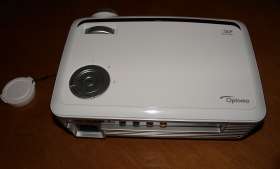
The HD65 really is very small, with only a 10.2 inch by 7.4 inch footprint. It's white, with silver and black trim, so it's cute.

From the front: The recessed zoom lens, Top of the Optoma HD65 projector.only sticks out enough so you can adjust the focus ring. Like the HD71 it has minimal placement flexibility, as it only has a 1.1:1 zoom ratio (10% adjustment range), and lacks adjustable lens shift.

There is a button for the front drop down foot, near the center bottom. It's a really small button, easy to overlook.

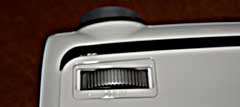
Moving to the top, you'll find the The Optoma HD65 projector zoom lens controls.dial for the zoom function of the lens.

Like almost all lower cost home theater projectors, the lamp door is on the bottom of the HD65, so to change the lamp, you would have to unmount the HD65 from a ceiling mount if you are using one.

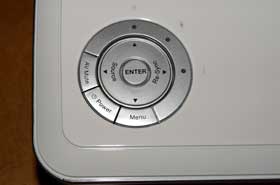
Further towards the back, is the control panel. In this case a multi-ringed affair. The outer ring has three buttons, the AV Mute, the Power button (once on, twice off), and the Menu button. There are also three indicator lamps, one for power, one for lamp, and one for temperature.

The Optoma HD65 projector control panel.The inner ring has the four arrow keys for navigating the menus, with the left and right arrow keys doing a second function when the menus aren't in use. The left arrow is the Source select button, and the right one, Re-Sync, for triggering the auto-sync button to let the projector figure out the best settings for a computer source.

And, finally, in the very center, is the Enter button.

All considered, very functional!

The Optoma HD65 projector input panel.That takes us to the Input panel on the back. The Optoma HD65 input panel, from left to right has S-video, an analog computer input (the standard HD15 connector), that supports analog computers, European SCART, or component video. Next comes three RCA jacks for component video, and a single RCA jack for composite video. Further to the right, is an HDMI input (1.3), a service port, and finally a 12 volt trigger for controlling a properly equipped motorized projector screen.

Review continues below this advertisement:


Below all of this, is the power receptacle on the left, and a Kensington security lock slot on the right. There is no rear infra-red sensor, which wasn't a problem in either of my rooms, but could pose a slight challenge if you are mounting the projector in front of you, in a larger than typical room, making a clean bounce of the signal off of the screen a bit difficult.

OK, time to take a close look at the HD65's overall picture quality.

Optoma HD65
Image Quality
General Performance
Warranty
Summary, Pros, Cons