The PT-DW5000U offers a number of advanced features, some controllable, some part of the design, not found in less expensive projectors (and even some more expensive ones). Many of these have already been mentioned in the other sections.
PT-DW5000U Projecto - Menus
Panasonic will not win any awards for good looking menus, but they are very functional. The menus themselves are translucent, that is, you can partially see through them, which is handy when you are dealing with a large menu, and you are trying to do something like make changes to color balance, where the menu is blocking a good portion of the screen. Still, I would have preferred that the menus be a little less translucent as I often found them a little hard to read if the content on the screen behind the menu is very "busy".
PT-DW5000U Projecto - Menus
PT-DW5000U Projecto - Menus
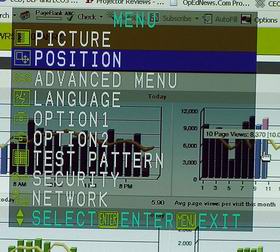
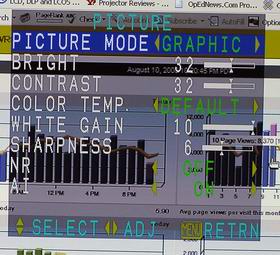
On the left is is an image of the Main Menu, which provides access to nine separate menus. The first menu to consider is the Picture menu which controls most of the color handling aspects of the projector.
First is the Picture mode that lets you choose from those previously mentioned Presets such as Dynamic, Graphics, Cinema, etc. The Color Temperature control allows choice of Default, High, Medium, and User settings. According to the manual, the High setting, as expected, increases color temperature, adding more blue to the color balance. As I mentioned previously, using this setting likely would add additional lumens in our brightness measurements.
Selecting User, allows you to individually control the Red, Green, and Blue levels, there are two separate areas, one for lower ranges (darker) and one for the higher (brighter) ranges. There is also a separate control for White Gain which allows the increase or decrease in white intensity.
Brightness, Contrast and Sharpness functions are all pretty apparent. There is also OFF/ON controls for image Noise Reduction, and for Panasonic's AI control. Noise Reduction options are different for video sources vs. computer and digital (DVI).
AI (artificial intelligence) allows the projector to use its algorthyms to adjust images to maximize image quality, on a frame by frame basis.
The Position Menu (not shown) allows the image to be moved horizontally or vertically within the projected area. There is also Aspect ratio control, which has an Auto function, or you can select an aspect ratio (4:3, 16:9...) manually. There is also HVFit which will have the source fill the screen if it is different from the projector's aspect ratio (basically stretching horizontally or vertically as needed). The Position menu also allows you to digitally zoom in, with separate controls for horizontal and vertical. Keystone correction is also on this menu.
That takes us to the Advanced Menu: Digital Cinema Reality - a fancy name for (when engaged) automatically handles frame rate conversion from 24 frame video, a fairly standard feature. Blanking is interesting, it allows masking the edges of the screen to mask noise often associated with the edges of lower resolution video sources.
Clamp Position allows you to have the projector show you when black levels are being crushed by showing them in green, so you can make adjustments to compensate!
The Raster Position control I have seen on a few other projectors. It will allow you to "slide" a less than full screen image. The best way I can describe: You have a movie with letterboxing. You can use this control to move the top of the image up to the top of the screen surface, eliminating the letterbox there. (It would now be bigger at the bottom). And if you could controld the drop of the screen to a 2.35:1 instead of 16:9, you would now have the movie filling the entire visible screen, in it's correct widescreen format, with no letterboxing.
Option 1Menu: We're getting serious now. Color Correction allows you separate user control of RGB and CYM (Cyan, Yellow and Magenta). Next is Contrast, which is a simple control of standard, or High. High stops down the Iris, for less brightness and increased contrast. There are no middle settings.
Memory settings - I'll touch on that right after the Menu section is finished. Also on this menu, is a choice of two modes for working with DVI signals, based on what resolution the source is providing.
Option 2 Menu - a Setup menu, basically, it allows positioning Front/Rear/Floor/Ceiling (inverted). This menu also allows selecting Dual or Single lamp mode. In single lamp mode the projector will automatically use the lamp with the least hours on it, or you can select manually, which lamp you want to use.
This menu also allows you to select High or Low Power modes. (As noted in the Projector Brightness section, the Long Life lamps only operate in Low Power mode.)
Also on the Option 2 menu is control of the RS-232 serial port, a summary of system information, and full fan control, including standard or high altitude settings, as well as adjusting the fan output depending on the DW5000U's mounting angle.
A Function control (FUNC1) allows you to program in an operation for the matching FUNC1 button on the remote, such as lamp power or aspect ratio. Lastly, there is an auto power off option, if there is no input signal. It can be turned off, or set to power down this Panasonic projector at 45, 60, 75, or 90 minutes of no signal.
Lastly is the Password control for access to service menus (technicians only please).
I didn't intend to go over every menu option, they are all in the manual, which is available at Panasonic's site. I have skipped a number of items and even a couple of menus.
In fact there is the Test Pattern menus with 8 different test patterns, and also a Security menu that I won't get into here, designed to prevent theft, or at least, to prevent the thief from using the projector.
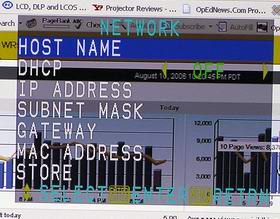
The last menu, is an important one for commercial installations, and that is the Network menu. The Panasonic can be controlled (power, settings, the whole enchilada, from a web browser, when hooked up to a network. In addition, the PT-DW5000U can send out an email over the network to advise technicians, or users of issues, such as lamp failures, or error problems. Note, from the best I can tell, the web browser must be running Windows. I do not know if it can be run from a Mac, although there wouldn't seem to be any reason why a new Mac with Intel, running windows, couldn't control the Panasonic. Bottom line, if you are a Mac user, check with Panasonic.
That concludes the longest writeup I have ever done of a projector's menus, and I skipped plenty. Time to move on, to a related area: