Please Visit
Our Sponsors

Optoma HD71 Home Theater Projector Review: Overview and Physical Attributes

4/19/2008 - Art Feierman

Overview
Image Quality
General Performance
Warranty
Summary, Pros, Cons

Just what I've been looking for - another really bright low cost home theater projector!. There certainly aren't too many out there, most notably, the Panasonic PT-AX200U (still the brightest in class), and the Epson Home Cinema 720, which is also very bright.

While both of these 3LCD projectors are at least as bright as the HD71, when in they are all in their brightest modes (Dynamic, etc.), the Optoma is the brightest of the 720p home theater projectors when comparing their best movie modes. Even the Panasonic, when using Vivid Cinema mode, (which sacrifices some "best" performance for extra lumens), offers just about the same as the Optoma HD71 projector. The HD71 is over 50% brighter, in best mode vs. best mode. The Epson doesn't even come remotely close in brightness, in best mode.

Brightness, for many, is a key performance feature, especially those needing to deal with some ambient light, especially for those without the classic dedicated theater room. Brightness isn't the only strength of the HD71. I found the HD71 to perform well in most areas, with weaknesses mostly limited to physical placement, since it is a typical DLP projector, with no lens shift, and a very limited zoom lens.

The image above is from House of the Flying Daggers off of a Blu-ray DVD.

Optoma HD71 Projector Highlights:

  • One of the brightest 720p home theater projectors
  • 6X color wheel
  • Color accuracy not great, out of the box, easily correctable
  • Image noise a little more than most projectors, but not out of line for typical competing DLP projectors
  • Very limited placement flexibility - zoom lens only 1.1:1, making this a table top or ceiling mount projector.
  • Very good remote control
  • Unusual for a home theater projector, the HD71 contains a small speaker for sound, a plus for some home applications and for doubling the HD71 for biz
  • Overall, a well thought out projector with tremendous consumer appeal
  • Excellent price performance

Let's get started:

Image above - from Space Cowboys, on Blu-ray.


Optoma HD71 Home Cinema Projector: Basic Specs

MSRP: $1299
Technology: Single Chip DLP
Native Resolution: 1280x720
Brightness: 2400 lumens
Contrast: 4000:1
Zoom Lens ratio: 1.1:1
Lens shift: No
Lamp life: 3000 hours at low power, 2000 hours at full lamp power
Weight: 6.3 lbs. ( 2.8 Kg)
Warranty: 1 Year Parts and Labor standard

Click here for more complete Optoma HD71 specifications, and brochure.


HD71 Home Theater Projector: Physical Tour

It's small, it's white, it's a box. Not a bad looking box, but the HD71 is about what comes out of the lens, not it's physical beauty.

From the front. The recessed zoom lens, with its 1.1:1 zoom ratio, has a protective door to keep out dust when not in use.

There is a button for the front drop down foot. The HD71 has an interesting combination of feet - the center front one is complemented with left and right feet not far behind, and then there is a last adjustable foot in the left rear. All in all, it works well enough! An infra-red sensor is also located on the front, below the lens, for the remote control.

Moving to the top, you'll find the zoom and focus controls. Typical of Optoma, the "build quality" of the controls is less than great. Adjust the zoom and the image shifts out of focus, and the image may jump a little. Better build quality would not have that happen. Still, this is a very minor annoyance, adding a few seconds to your setup, each time you place the projector on a table and adjust. Of course, if ceiling mounting, you'll set it once, and be done with this aspect.

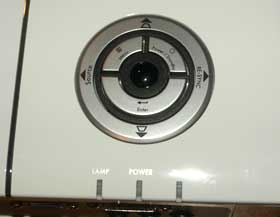
Also on the top of the projector, you'll find the he control panel, which has all the basics. There are two concentric "rings" The outermost ring is essentially four buttons in the usual diamond shape. When using the menus, they are your up/down/left/right arrow buttons. When not in menu mode, the top and bottom arrows allow you to adjust keystone correction, the left arrow. More importantly the left button is your source select button. The right arrow does a computer re-sync to lock on to a computer source.


The inner ring consists of three buttons - the top left opens the menu (or closes it), and the top right is the Power/standby button. (the usual press once to power up, twice to power down). The whole lower semi-circle is the enter button. Further back are the typical three indicator lights - Lamp, Power, and Temp (from left to right).

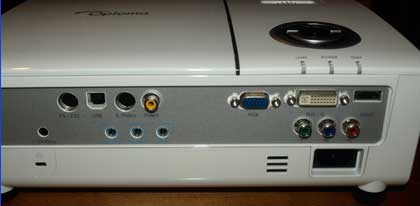
That brings us to the input panel on the back. The Optoma HD71 is well endowed for a moderately priced 720p home theater projector. As you can see above, from right to left: 1 HDMI input (video and audio), one DVI-D (HDMI compatible, can handle HDMI, or DVI), VGA input (HD15) for analog computer. Below those there is a component video input (3 color coded RCA jacks), and below it the power cord receptacle.

On the left side, there are the obligatory S-Video and Composite video inputs as well as a USB input and an RS232 for command and control from PC or room controller. Below these, are a 12 volt trigger for a motorized screen or other 12 volt application, as well as three stereo audio inputs - one each for video/s-video, VGA / DVI-D, and component video inputs. (the HDMI connector handles audio from HDMI sources). That pretty much covers it on the back, except of course, for the Kensington lock slot.

Overview
Image Quality
General Performance
Warranty
Summary, Pros, Cons