Please visit our sponsors

Optoma HD8600 Projector Review

Welcome to our in-depth projector review of the Optoma HD8600 1080p home theater projector. This review has just been posted. The competitors section is not yet completed and other screen images of the HD8600 projector will be added. We've rushed this to you, because we know you are waiting! Enjoy!

December 2009 - Art Feierman


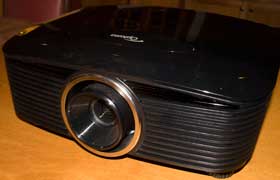
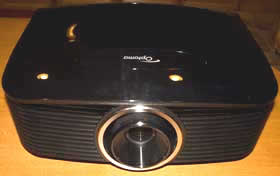
The Optoma HD8600 projector.

The Optoma HD8600 projector earns our Hot Product Award!

Optoma HD8600 Projector Overview

I really like this projector. First, most of the projectors I've gotten to review this fall are primarily upgrades of last year's models. A little better, a little less expensive, and a new feature, here and there. The HD8600, by comparison, is a brand new projector.

It's not easy being a brand new model in the Optoma's price range. As an $7500 (or more, depending on lens) projector, it faces some very stiff competition.

As it turns out, though, Optoma is up to the challenge. It is certainly a serious contender. It's bright, has extremely good color, and a a vibrant look and feel.

Joker image from the Optoma HD8600 projector.

The projector itself is a 1080p resolution, single chip DLP. It claims 1600 lumens (it didn't measure that high, but is brighter than most of the competition).

The HD8600 projector is being sold through the CEDIA channel, primarily through local installing dealers. The HD8600 is not supposed to be available online, and a quick search didn't turn up any dealers when I looked.

Whereas some projectors have very long range zoom lenses for great placement flexiblity, Optoma has taken a different tack. They offer a choice of three lenses. The standard lens is a 1.25:1 zoom, but there are two others, one is a longer throw zoom, and the other an extremely short thow fixed lens (no zoom). The advantage of Optoma's design is that shorter zoom lenses are brighter, and easier to make with less distortion. Some of that shows up in the brightness of this projector, no doubt.

Explosion image from the Optoma HD8600 projector.

The HD8600 is loaded with a number of dynamic features. The native projector performance is really impressive. Some of the dynamic features, however, could be improved, which will be discussed below or elsewhere in this review.

Despite any complaints about some of these features, the HD8600 has a really good combination of strengths.

Let's get started!

^ Back to Top

HD8600 Projector Highlights

  • Well above average brightness in "best mode" for movie watching 696 lumens measured
  • Above average "brightest" mode measured a very heathy 1166 lumens, with good color
  • Really good post calibration color accuracy with excellent skin tones
  • Extremely sharp image
  • Excellent placement flexibility thanks to a choice of a "standard", wide or telephoto lens, plus lens shift
  • Dynamic and manual iris for very good black levels, although dynamic iris action is a bit more visible than irises on some other projectors
  • CFI and other dynamic features
  • A premium projector, providing a very good value proposition

Indiana Jones image from the Optoma HD8600 projector.

^ Back to Top

Projector Specs for the Optoma HD8600

MSRP: $7499. Wiith standard lens, $8999 with long throw lens, and $8499 for the ultra-short throw lens
Technology: Single chp DLP
Native Resolution: 1080p (1920x1080)
Brightness: 1600 lumens
Contrast: 50,000:1
Zoom Lens ratio: standard 1.25:1, two optional lenses, all manual
Lens shift: Vertical and Horizontal - manual
Lamp life: 2000 hours at full power (Bright), 3000 in low power (Standard)
Weight: 19.0 lbs. (8.6 Kg)
Warranty: 3 Years Parts and Labor, with first year Express Replacement Service

Click for more complete specs and brochure

Sean Connery image from the Optoma HD8600 projector.

Above image from The Hunt For Red October (Blu-ray disc). The HD8600 looked especially fine on scenes like this one.

^ Back to Top

HD8600 Projector - Special Features

Pure Motion - Creative Frame Interpolation

CFI is discussed at several points in this review. The HD8600 offers three selections - Low Medium and High. The purpose of CFI is to smooth out motion. This is a feature that started appearing last year on a couple of projectors and is getting more widely used. Many, if not most, LCDTVs now offer it. As with CFI in general, when used with movies at 24fps, the end result tends to have a bit of a "live digital video", or "soap opera" look. As a result, few people use it for movie viewing although it's very popular for sports. The Optoma implementation, however doesn't work with all source types. As a result the CFI will not work on all HDTV sports content. The Optoma implementation is flawed somewhat from not supporting all content, and for being a little coarse in the Low setting, especially for movies. That said, most projectors don't offer any CFI. Of the closest competiton, the JVC RS25 also offers a CFI, which also is not one of the best implementations around. Use the feature where you like it. Consider it a bonus feature.

Star Trek image from the Optoma HD8600 projector.

Color Management System (CMS)

Optoma provides a primary and secondary color management system on the Optoma HD8600. The CMS has the usual ability to separately adjust each color. We do not normally do a CMS calibration, and achieved excellent color without doing so, with the HD8600.

August Rush image from the Optoma HD8600 projector.

Pure Color

Most likely this is part of Optoma's Brilliant Color implementation. It's mostly like dialing up the "pop and wow" of the image. This feature can be really nice, but, like most dynamic features, takes a toll someplace else. You want the more dynamic look, you also get a slightly less natural look. That's a typical trade-off. Compare the two images immediately below. Same exposure, first one has Pure Color off, the second, has it set to 2, which is very moderate. Study them if you like. Look at the diplomat's upper left forehead - you can see how the lighter areas are lighter still with it on. Mostly though, having it on gives more punch, if you have the image looking great with Pure Color to off, then turning it on is a little too much for a purist. In most cases, I find settings of 0 to 2 to be perfectly acceptable for most content.

Image with Pure Color Off.

Image with Pure Color set to 2.

Heads up: The image below is from the Stargaze HD Blu-ray DVD. Some really spectacular imagery on this disc, for those with an interest in astronomy.

Galaxy image from the Optoma HD8600 projector.


Interchangeable Lens System


Choose between two zoom lenses - the standard lens, which most will use for ceiling mounting, a longer zoom which will primarily be used by those rear shelf mounting, or a fixed wide angle lens suitable for rear screen setups, or very close, front ceiling mounting. The lenses use a bayonet mount and easily snap in. You can get the projector with any of the three lenses. It's $7499 when ordered with the standard lens and $1000 or $1500 more when purchased with one of the other lenses.

Wall-E image from the Optoma HD8600 projector.

Pure Detail

This feature looks like it's dynamically affecting contrast, and perhaps gamma. Crank it up and you definitely can see skin tones start looking a lot less natural (too contrasty). This is another dynamic feature you can play with, to use as needed (or preferred). And like most of them, you are altering the image, not just "improving it". I recommend moderation.


HDTV image from the Optoma HD8600 projector.


^ Back to Top

NEXT: Take a physical tour of the Optoma HD8600

Projector Search
Projector Packages