
Menu
Image
The MovieMate 72 lacks a comprehensive menu system. Instead it relies on several menus triggered by different buttons on the remote, as well as discrete functions also accessable from the remote control.
The Visual Setup Menu is accessible from the Visual Setup button on the remote. As you can see, it has three sub-menus, Image, shown below, Option, and also an Information menu.
Select the image menu and you can toggle between the usual image settings: Brightness, contrast, color saturation, sharpness, and tint.
The DVD's menu provides information on your DVD or CD or MP3 source. Look at this image of the menu, and you get the idea.
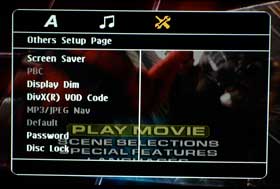
There is also an setup menu for player and audio functions, as shown to the left. The menu shown is from the Audio Setup page. The A menu lets you set language displays for various options.
The Others Setup page handles an assortment from screen saver, and controlling the brightness on the player's display. It also has the projector's password security and disc lock feature. I'll discuss those at the bottom of this page.
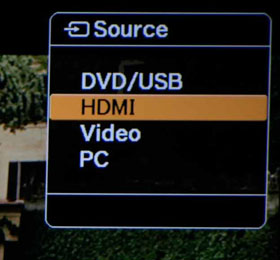
The Source button on the projector or the remote, brings up a small menu with a choice of four sources; DVD and USB, HDMI (the highest quality) - and the Epson projector will accept sources with resolution all the way up to 1080p. There is also the Video inputs, and the PC input, which can feed a typical analog computer display signal, or a high quality component video source.
All considered, the menus are rather scattered, and there are no separate red/green/blue controls, but other than that, just about everything's there. I realize that being an all-in-one projector means lots more controls, and I have no problem with separate menus for controlling DVD and Audio, others for general projector functions, but I still think the projector would be friendlier if the menus were consolidated more.
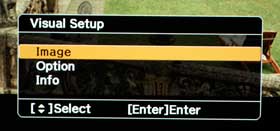
Image
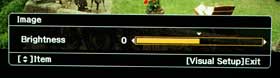
Brightness
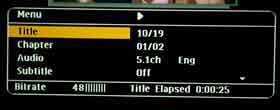
DVD
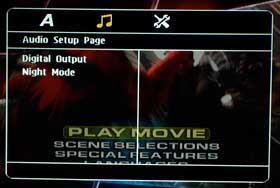
Audio
Setup
Source
There are no traditional user savable memory settings. That said, adjust color, brightness, or other features, and the MovieMate 72 will remember them. It's just that you can't pre-define, and save a number of preferred combinations of settings.
The MovieMate 72 certainly has tons of buttons, but that has to be expected, since you are not just controlling a projector, but also a DVD/music player. At least half the buttons relate to the player.
We'll start at the top.
On the top left is the power switch (press once for on, once for off), and next to it is a small switch to toggle the three rows of buttons immediately below, between a numeric keypad and function buttons. There are several reasons for the numeric pad, including directly jumping to a chapter on a DVD or track on a CD, as well as inserting a password as part of the child related security features.
On the top right, is the eject button for the built-in player.
The next three rows have the numeric buttons, which double to bring up functions including: On Screen display of the DVD player data, Repeat options, Program mode (for example you can change the order songs play in on a CD), Surround sound options, Digital zoom in (lets you part of the image - then you can pan around the screen with the arrow keys). There is also a Sleep button which lets you set the desired time before the projector shuts down if nothing is playing. Lastly, there is an aspect ratio button.
Next comes three larger buttons. The left most is your Source Select, which lets you toggle between the internal DVD player, the HDMI input, computer/component video input and USB input. The center button is labeled color mode and toggles you between five preset modes: Dynamic, Living Room, Game, Theater, and Theater Black.
On the right, is the Break button (symbolized by a coffee cup image). Pressing the Break button will stop playing, but have the projector to continue to put light up on your screen, so that the room doesn't remain dark, when you want to get up to do something.
Next comes buttons for controlling the play of the DVD/CD player. You'll find the usual play, reverse, forward, back chapter, forward chapter stop, and pause controls.
Next comes the traditional four arrow keys with center Enter button. Surrounding them are the Top menu button, Menu button, Setup button, and Return button.
Those buttons are primarily for controlling the player, but the arrow keys and enter and return buttons also are used for controlling some projector functions.
As we get to the bottom, there are two large rocker switches, on the left, keystone adjustment, and on the right, volume up/down. In between these is the Visual Setup button, one of the most important, as it lets you toggle through brightness, contrast, sharpness, tint, etc.
Right below that button is the Mute button, which mutes the audio. The next row has Audio, Subtitle, and Angle buttons for the player. And lastly, the bottom most button is Image, which lets you mute the image. This can be used just to blank the screen, but its primary purpose is to turn off the lamp, so that you can listen to music through the system, without wasting lamp hours.
The remote lacks a backlight, and to me, that's always a negative. Most of the buttons are whitish buttons designed to be visible in the dark, but since the buttons themselves aren't labeled, rather the labeling is around the buttons, while you can spot familiar buttons, you'll have to memorize their function since you won't be able to read anything on the remote when the room is dark.
For this type of device - an all-in-one projector, the remote seems reasonably good, backlighting notwithstanding. Buttons are fairly well organized by function, and generally large enough and spaced enough that all but the largest hands should have no problem.
Introducing the Hisense C1: A cube-shaped 4K UHD lifestyle projector with an RGB triple laser light source and integrated JBL ...
The BenQ X3100i is a 4LED, 4K UHD (3,840 x 2,160p) 0.65" DLP short-throw gaming projector that offers a BenQ-rated ...
