BenQ W1000 - Review Summary

A summary of the BenQ W1000 projector's pros and cons and capabilities.
3/14/10 - Art Feierman


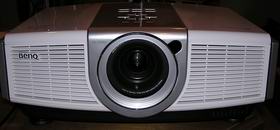
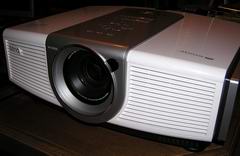
The BenQ W1000 projector.

The BenQ W1000 projector earns our Hot Product Award!

BenQ W1000 Projector - The Bottom Line


This is our third review of a $999 projector. This BenQ W1000 shares a lot of "projector" with the Vivitek H1080FD, but they are different enough, to have some different traits. All three are single chip DLP's but after that, there's a reasonable amount of difference. One thing I really love about the BenQ is its brightness!

That's because when brightness is important, the BenQ W1000 has a distinct advantage over the Vivitek, and even more compared to the Optoma! Overall, there are few projectors under $5000 that are as bright. With over 1200 lumens in its "best mode" (with Brilliant Color On, and 644 with it off), the BenQ W1000 can handle an impressive amount of ambient light.

Compare brightest modes and the W1000 has a brighter picture with more accurate color, I'd say, than the other two $999 projectors, and for that matter the Mitsubshi HC3800 and Epson Home Cinema 8100, two not too much more expensive competitors.

Black level performance is one of two weak links for the W1000. I'd say the W1000 defines "entry level" black level performance. Both the Vivitek and Optoma are slightly better, but all three really are in the same class. If you want better, look to that Mitsubishi HC3800, or the Epson.


MIB image from the BenQ W1000 projector.

In a family room that can't be fully darkened, however, you aren't going to miss the blacks that much. Let's put it this way. If you are going to be an enthusiast - you will want better blacks, but the picture is always very watchable, in fact, other than dark scenes, the W1000 rocks, with lots of punch, it is bright and dynamic.

Prince Caspian image from the BenQ W1000 projector.

For HD sports - awesome. It's the brightest thing around, and with good color to boot. Its image is sharper than most projectors, and basically there's nothing not to like. Well, actually, for sports, having creative frame interpolation would be nice.

Star Trek image from the BenQ W1000 projector.

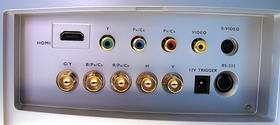
Color performance is pretty good, not exceptional. This is as as one would expect from one of the lowest priced 1080p projector around. The W1000 doesn't offer a full set of calibration controls so the overall color temp is a little off. It's definitely a little warm (toward red, soft on blues), whereas the similar Vivitek, is the other way around. Functionality of the projector is very good. Inputs are ample, with two HDMI inputs. The speaker will be a deciding factor for many people not looking for a permanent installation, who might just get to make good use of it. The audio out means you can output any sound routed through to the projector, over HDMI, or input through one of the two audio inputs. That might come in handy if you want more powerful sound while moving it around.

Lau image from the BenQ W1000 projector.

Skin tones really did look pretty good in "best" Movie mode. Many projectors will look a little better in that regard, but few will have a complaint about BenQ W1000's "best" mode. In terms of color accuracy, once we got done playing with it, even with Brilliant Color on, color was better than most of the LCDTV's I looked at recently at Best Buy and other stores. With Brilliant Color off, the BenQ drops from about the all time brightest (1225 measured lumens) under $5000 1080p projctor (for a best mode) to a still better than average 600+ lumens, and more natural skin tones.

The two images below, from the recent Star Trek movie: The first one, in "best" mode with Brilliant Color On, and the one right below, same exposure, Brilliant Color Off. It's darker, and definitely a touch more natural (though less dynamic looking).

Star Trek crew image from the BenQ W1000 projector.

Star Trek crew image with brilliant color off from the BenQ W1000 projector.

I mentioned another weakness besides black level performance, and that is the slow color wheel. For those of us who are sensitive to the rainbow effect, a 2x projector - is as slow as they come, so rainbows will be more visible than with any of the other projectors near the price. For me, I really can't deal with 2x, 3x, or 4x color wheels well enough to own a DLP projector of those speeds. I've had 5x and for me, that's not too bad, and with a 6x wheel, I rarely spot any rainbows. It may be that for someone, the faster wheels on the Optoma, Vivitek or Mitsubishi will work better for them. Of course the safe course, if you have no idea if you are rainbow sensitive, would be to get an LCD projector. Remember though, most people aren't rainbow sensitive.

MIB image from the BenQ W1000 projector.

The very bottom line:

Of the three $999 projectors, I like the BenQ W1000 the best. The reason is that it is exceptionally bright, and it has very good color, even in its brightest, cut through the ambient light, mode.

The W1000's brightness makes it ideal for a family room setup. The sheer brightness of it, had me thinking about buying one, and mounting it to the bottom of my rear shelf that holds my JVC. Too bad the zoom lens doesn't have the range. I'd just love those 2000+ lumens for my sports.


Baseball player image from the BenQ W1000 projector.

The BenQ W1000 is an entry level 1080p projector. In color accuracy, black levels and some other areas, it's not a match for projectors that start at about double the price, but, more importantly, the W1000 is still extremely impressive, with a dynamic image that dazzles.

Captain Pike here (below) really looked good on the bridge of the Enterprise (which looked great!).

Captain Pike image from the BenQ W1000 projector.

The BenQ W1000 becomes an excellent choice for a bonus room, or family room, expecially for watching a wide range of content, including movies, TV, HDTV, and definitely sports. At the same time, it can work as a first projector if you are creating a darkenable home theater.

BenQ W1000 Projector: Pros, Cons, and Typical Capabilities


Blazing Saddles image from the BenQ W1000 projector.

^ Back to Top

BenQ W1000 Projector: Pros

  • Brightest of the low cost 1080p projectors - great for family rooms, bonus rooms, where some light is present
  • Good color, very satisfactory for most folks (though definitely not a purist's projector)
  • Built in speaker - ideal for quick setup or taking outside, when you don't need "big sound". Speaker does a respectable job, though no low bass
  • Perfectly suitable as a portable business projector, with sufficient brightness, sound, other features
  • Lamp life very good 3000 hours at full power, 4000 in low power
  • Or as a portable in your home projector, move from family room to outside...
  • Two HDMI 1.3 inputs, full support for 24 fps, Deep Color, CEC etc.
  • Sharp image - not the sharpest of the DLP projectors, but sharper than many more expensive LCD projectors
  • No filters to change, minimizing maintenance

Another Blazing Saddles image from the BenQ W1000 projector.

^ Back to Top

BenQ W1000 Projector: Cons

  • Black level performance is very basic more typical of 720p projectors than the bulk of 1080p models. It's fine, though, for use in rooms that always have some light
  • Limited placement flexibility, and no lens shift (typical DLP projector)
  • Slow 2x color wheel, will make rainbows more visible for the small percentage who are susceptible
  • Fan noise is slightly louder than average, but typical of the smaller DLP projectors. In that regard it's far from the noisiest
  • In "brightest" mode, image noise becomes a bit noticeable, as Brilliant Color type features are engaged
  • No support for an anamorphic lens
  • Warranty - one year - too short for my taste, but typical of most lower cost 1080p projectors, although a few under $2000 models have 2 year warranties


Star Trek image from the BenQ W1000 projector.

^ Back to Top

BenQ W1000 Projector: Typical Capabilities

  • Lamp life (2000/3000 hours (full/low power)
  • Documentation (full documentation is on disc, there's a hard copy Getting Started guide)
  • Size, weight and styling
  • Menus

Warner Bros. image from the BenQ W1000 projector.'

That's all folks!

^ Back to Top

BACK TO THE BEGINNING: W1000